dreams importer
overview
The Dreams importer allows you to import your songs into LSP directly from Dreams! It just requires a link to the element on indreams.me and the length of the song (which are both entered on the usual song upload page).
The imports usually won't be instant. I have to start the process manually, so it's most efficient for me to run it on large batches of songs. It may take up to a week for the importer to run after you submit a song. I'll usually run it on weekends, and especially on jam days right before the jam.
If more than one weekend has passed and it still hasn't run, please send me an email at mail@littlesong.place.
After the upload is done, a .wav version of the song will be temporarily available to download from the song page. These take up a lot of space on the server though, so I'll delete old wave files periodically. I'll try to make sure they're available for at least a few weeks to give you time to download them.
Status: Songs currently waiting for import: 0
tips for imports
For best results:- Make sure your timeline doesn't loop if it isn't supposed to.
- If it is supposed to loop, use the Fade Out option in the importer to fade out the last 10 seconds of the recording.
- Make sure your song sounds correct with all of the Dreams volume settings turned all the way up - that's how it will be recorded.
- When setting the duration in the importer, make sure to leave enough time for any reverb/effect trails at the end. If in doubt, add extra time - any extra silence at the end will be removed automatically.
- Remember that the Dreams timeline's duration timer will be wrong if you use keyframes to change the tempo - make sure to add extra time to compensate.
how it works
The Dreams importer is a script that runs on my PC. It automates interactions with littlesong.place, indreams.me, and Dreams running on my PS5.
The script performs the following sequence for each song in the queue:
- Connect to LSP and get the song's indreams.me URL
- Load the indreams.me URL and click the "Play Later" button
- In Dreams (via remote play), remix the first element in the Play Later queue
- Play the song without recording to make sure all samples are loaded
- Play the song again, recording the audio
- Upload the song to LSP
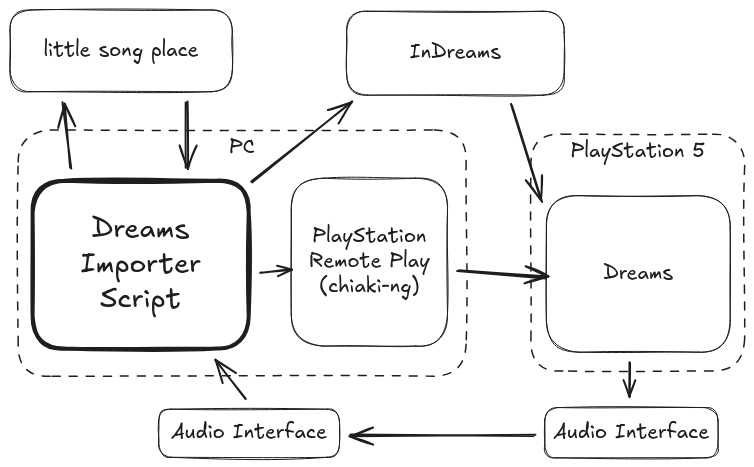
(For the audio nerds: The audio is recorded through a pair of USB audio interfaces, one connected to the PS5 and one to the PC. Audio is recorded at 16 bits/48 kHz (better than CD qulaity). The audio signal gets converted from digital to analog and back again, so there will be some inherent losses in this process. But in general it should be better than the lossy compressed audio you get from most HDMI capture cards or the built-in screen recordings.)